
How to cancel a subscription? (Android)
NOTE:
1. If you signed up for a free 3-day trial and you don't want to buy the subscription, cancel it at least 24 hours before the trial ends.
2. If you cancel an active subscription, you can keep using it until the next billing date.
How to unsubscribe?
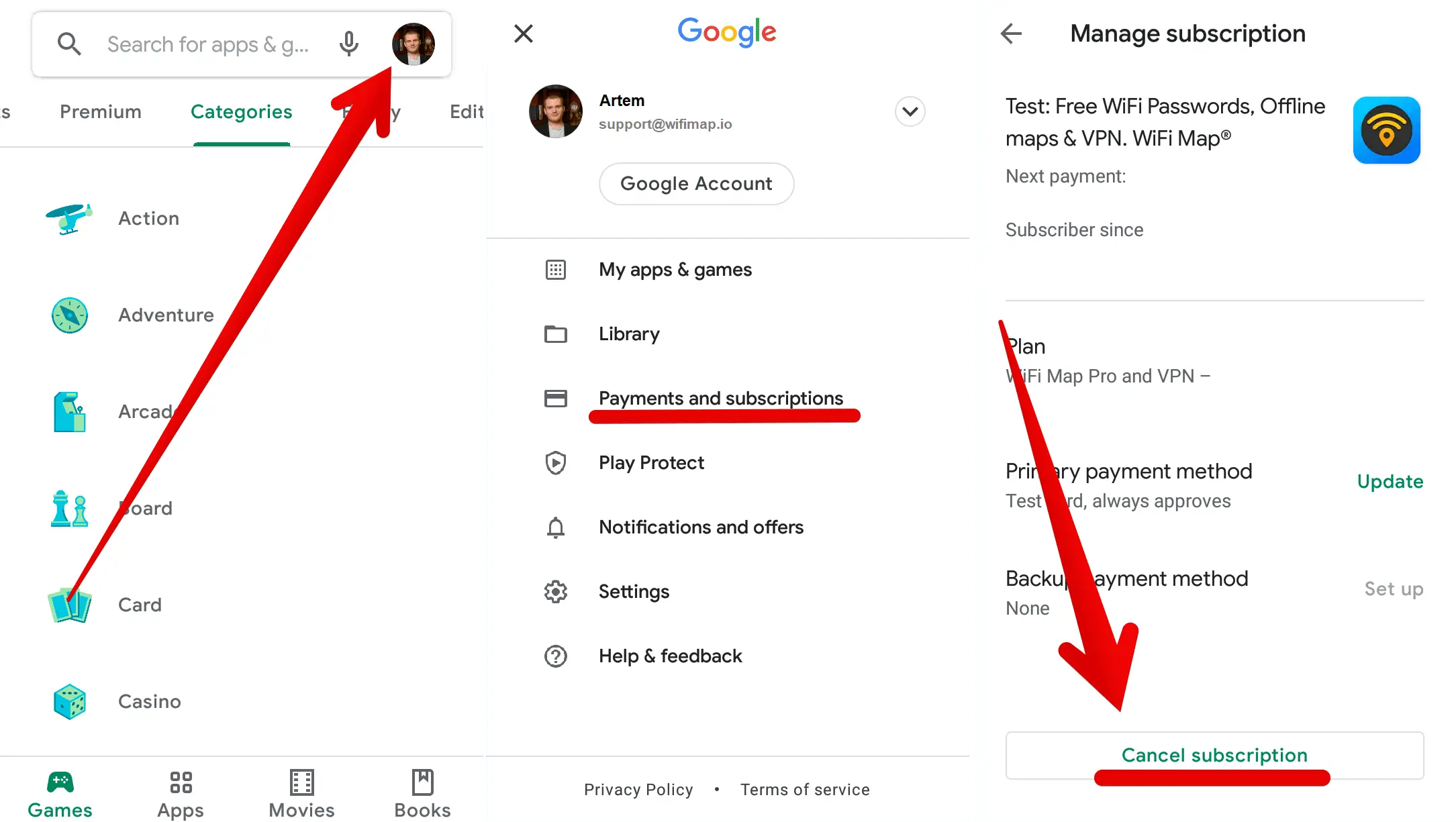
1. Open the Google Play app
2. At the top right, tap the profile icon
3. Tap Payments and Subscriptions → Subscriptions
4. Tap WiFi Map
5. Tap Cancel subscription
Pertanyaan terkait
How to cancel a subscription on iPhone
Here you'll find out how to cancel your subscription on iPhoneBaca lebih lanjut
How to cancel a free trial? (Android)
Here you'll find out how to cancel your free trial on AndroidBaca lebih lanjut
How to cancel a free trial on iPhone
Here you'll find out how to cancel your free trial on iPhoneBaca lebih lanjut
Bahasa
English
Español
Français
Italiano
Português
Deutsch
Türkçe
Bahasa Indonesia
Bahasa Melayu
Dutch
Tiếng Việt