
How to get a refund? (Android)
Please contact our support team via Live Support or at support@wifimap.io and send your order number (it should look like this: GPA.1234-5678-1234-12345..0).
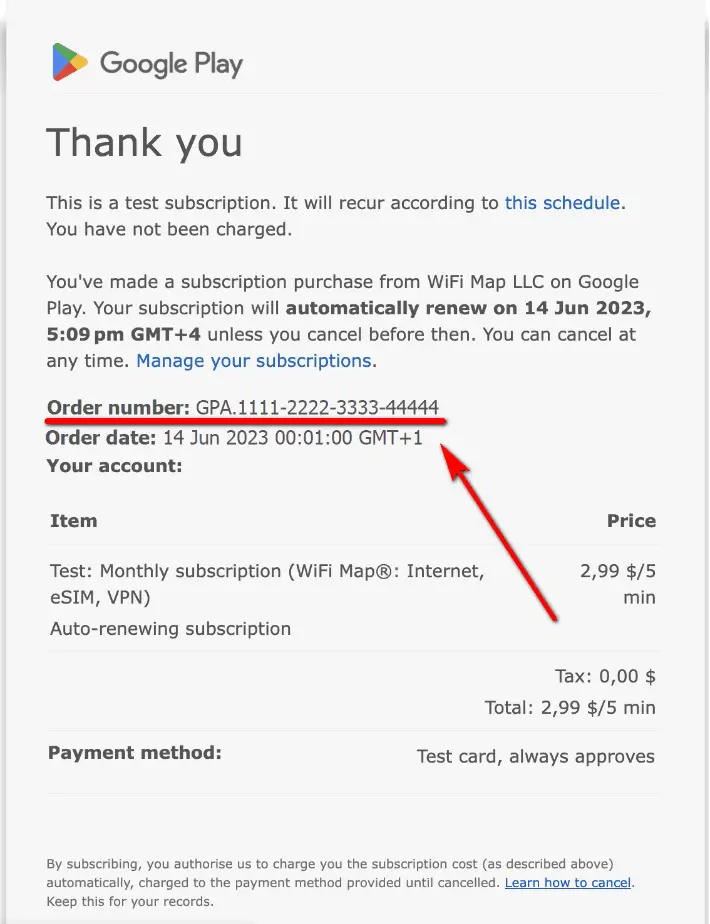
How to find your order number
After you buy something on the Google Store, you get a confirmation email that you can use as a receipt. You can find your order number on this receipt.
If you can’t find your confirmation email, you can get a receipt online:
1. Visit pay.google.com/ and sign in with your Google account.
2. On the left, click Activity.
3. To get your receipt, select an order.
Soalan berkaitan
How to cancel a subscription on iPhone
Here you'll find out how to cancel your subscription on iPhoneBaca lagi
How to cancel a free trial? (Android)
Here you'll find out how to cancel your free trial on AndroidBaca lagi
How to cancel a subscription? (Android)
Here you'll find out how to cancel your subscription on AndroidBaca lagi
Bahasa
English
Español
Français
Italiano
Português
Deutsch
Türkçe
Bahasa Indonesia
Bahasa Melayu
Dutch
Tiếng Việt