
How to cancel a free trial on iPhone
NOTE:
If you signed up for a free 3-day trial and you don't want to buy the subscription, cancel it at least 24 hours before the trial ends.
If you cancel during a free trial period, you will lose access to the subscription immediately.
How to unsubscribe:
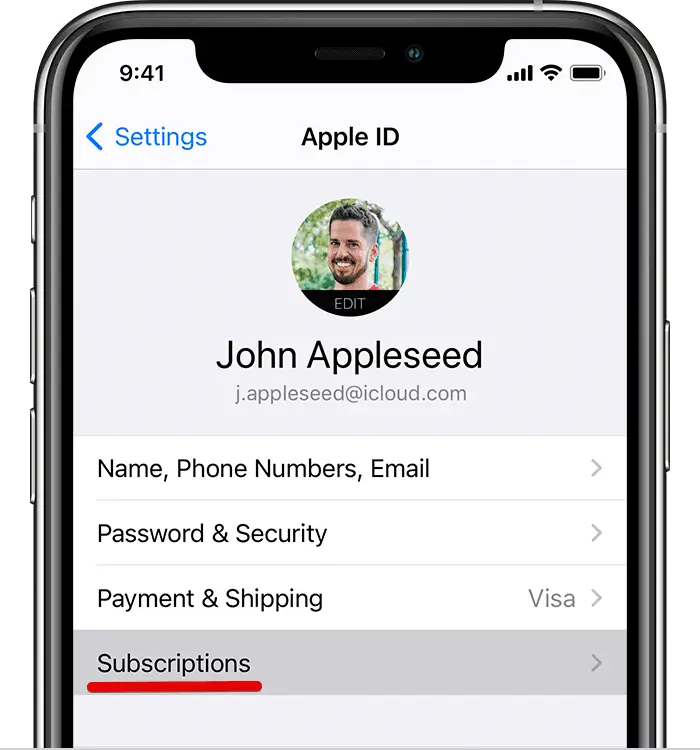
1. Open your device Settings.
2. Tap your name.
3. Tap Subscriptions.
4. Tap WiFi Map.
5. Tap Cancel Subscription.
İlgili sorular
How to cancel a subscription on iPhone
Here you'll find out how to cancel your subscription on iPhoneDaha fazla bilgi edinin
How to cancel a free trial? (Android)
Here you'll find out how to cancel your free trial on AndroidDaha fazla bilgi edinin
How to cancel a subscription? (Android)
Here you'll find out how to cancel your subscription on AndroidDaha fazla bilgi edinin
Diller
English
Español
Français
Italiano
Português
Deutsch
Türkçe
Bahasa Indonesia
Bahasa Melayu
Dutch
Tiếng Việt