
How to get a refund (iOS)
First of all, we want to let you know that we offer a free 3-day trial so all our users can experience the full potential of the app without any limitations on functionalities or disturbing ads.
If you were not satisfied and didn't want to pay for the subscription, you could easily cancel the free trial via your device Settings.
Regarding refunds, unfortunately, we do not have access to any client payments as per App Store guidelines. All the payments go directly to Apple and they are the ones collecting and refunding all the money.
How to request a refund for App Store purchases:
1. Sign in to reportaproblem.apple.com.
2. Tap or click "I'd like to," then choose "Request a refund."
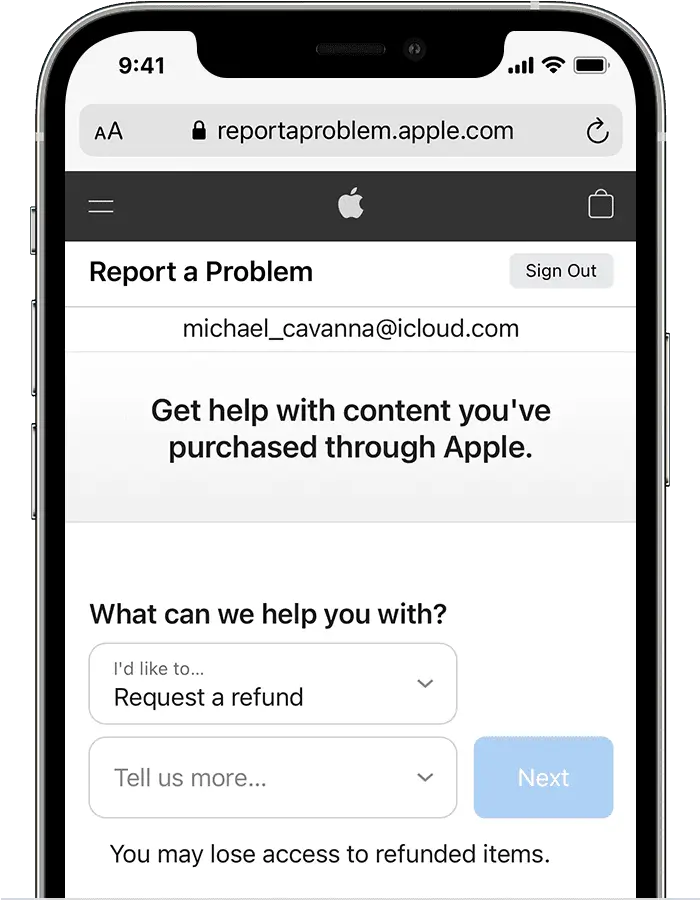
3. Choose the reason why you want a refund, then choose Next.
4. Choose WiFi Map, then choose Submit.
Câu hỏi liên quan
How to cancel a subscription on iPhone
Here you'll find out how to cancel your subscription on iPhoneĐọc thêm
How to cancel a free trial? (Android)
Here you'll find out how to cancel your free trial on AndroidĐọc thêm
How to cancel a subscription? (Android)
Here you'll find out how to cancel your subscription on AndroidĐọc thêm
Ngôn ngữ
English
Español
Français
Italiano
Português
Deutsch
Türkçe
Bahasa Indonesia
Bahasa Melayu
Dutch
Tiếng Việt