
How to connect to a WiFi hotspot
WiFi Map provides you with information about public and private Wi-Fi hotspots that have been added by members of WiFi Map community.
How to connect to Wi-Fi:
1. Open the map.
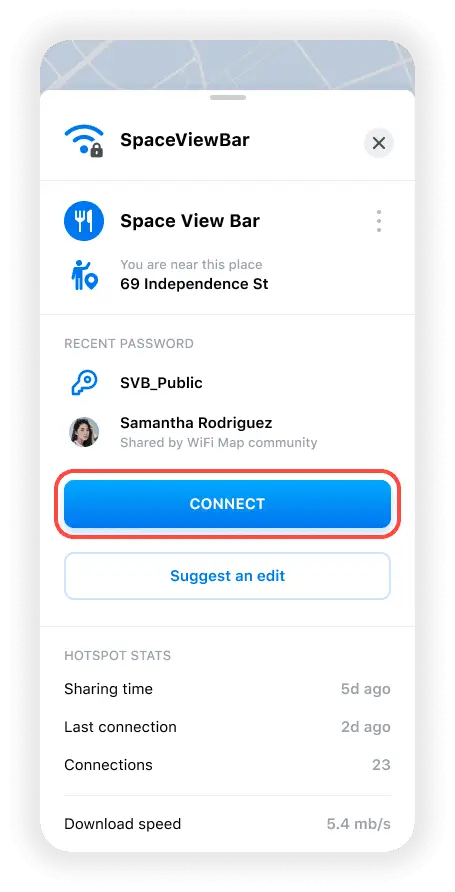
2. Tap the Wi-Fi hotspot to view all the Wi-Fi details you need to connect: Wi-Fi name, place name, address, and password (if required).
3. Go to the place where this Wi-Fi hotspot is located. You can tap the address field to get a route.
4. Get within range of the Wi-Fi signal (~30m/100ft).
5. Go to your device's Wi-Fi setting and join the network.
or
tap the CONNECT button that will appear on the Wi-Fi details screen.
Thank you for your contribution!🙏
Domande correlate
How to update WiFi info
All proposed changes for WiFi should be done via the "Report a problem" feature. Per saperne di più
How to heal WiFi hotspot?
Your contribution to improving WiFi health helps millions of people get FREE Internet access.Per saperne di più
How to delete a WiFi hotspot
Please contact our support team via Live Support or at support@wifimap.io and send a screenshot of the WiFi hotspot you want to be deleted.Per saperne di più
Lingue
English
Español
Français
Italiano
Português
Deutsch
Türkçe
Bahasa Indonesia
Bahasa Melayu
Dutch
Tiếng Việt